Customizable Report Card Template: A Practical Tool for Educators and Parents
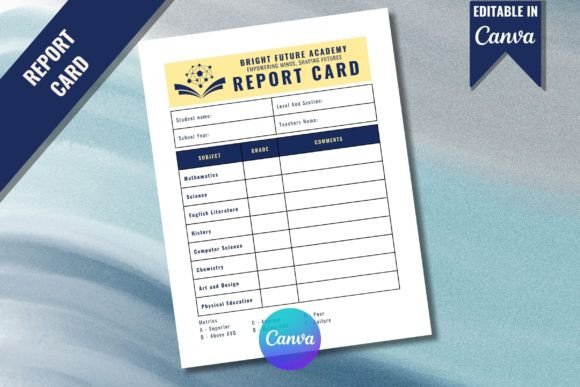
The Customizable Report Card Template offers a versatile solution for educators, homeschooling parents, and administrators looking to create professional and personalized report cards. Designed with flexibility in mind, this template allows users to tailor content, formatting, and design elements to suit specific educational needs. With its 8.5 x 11 inches US letter size, it is optimized for standard printing and easy distribution. Whether you're creating report cards for a single student or an entire class, this tool provides a streamlined approach to documentation.
One of the standout features of the Customizable Report Card Template is its compatibility with Canva, a popular graphic design platform. This integration enables users to access a wide range of design elements, fonts, and layouts without requiring advanced design skills. The template is fully editable, allowing for adjustments to text, colors, and visual components to match institutional branding or personal preferences. This level of customization ensures that the final product aligns with the unique requirements of each user.
How It Compares to Traditional Report Card Methods
Traditional report card creation often involves using pre-printed forms or manually designing documents from scratch. These methods can be time-consuming and may lack the flexibility needed to accommodate different grading systems or school-specific requirements. In contrast, the Customizable Report Card Template streamlines the process by providing a ready-to-edit framework that reduces the need for extensive design work.
Compared to other digital tools, such as Microsoft Word or Google Docs, the Canva-based template offers more design options and a user-friendly interface. While word processors allow for basic formatting, they may not provide the same level of visual appeal or ease of customization. For users who prioritize aesthetics alongside functionality, the Canva template presents a compelling alternative.
It’s worth noting that the template is not a one-size-fits-all solution. Users who require highly specialized formats, such as those used in international schools or alternative education programs, may find that additional modifications are necessary. However, for most standard academic settings, the template provides a practical and efficient starting point.
Key Features and Benefits
The Customizable Report Card Template includes several features that enhance usability and effectiveness. One of the primary advantages is its ready-to-print PDF format, which ensures consistency across different devices and printers. This eliminates the risk of formatting issues that can occur when exporting files from design software.
Another benefit is the availability of free elements within Canva. Users can access a library of icons, images, and graphics to enhance the visual appeal of their report cards without incurring additional costs. This feature is particularly useful for educators on a budget who still want to produce high-quality materials.
The template also supports collaboration and sharing. Once created, users can easily share the document with colleagues or parents for review or feedback. This functionality promotes transparency and engagement, making it easier to communicate student progress effectively.
When to Choose This Template
The Customizable Report Card Template is ideal for users who value both efficiency and creativity. Educators who want to maintain a consistent look across multiple report cards while incorporating unique elements for individual students will find this tool beneficial. It is also suitable for parents who are homeschooling and seeking a structured yet flexible way to track their child's academic performance.
For institutions that already use Canva for other design tasks, this template integrates seamlessly into existing workflows. It can save time and reduce the learning curve associated with new software. Additionally, the ability to edit and update templates as needed makes it a long-term solution for ongoing use.
Limitations and Considerations
While the template offers many advantages, it may not be the best choice for every situation. Users who are unfamiliar with Canva may need to spend some time learning the platform’s features before they can fully utilize the template. This could be a barrier for individuals with limited digital literacy or those who prefer simpler tools.
Another consideration is the reliance on Canva’s ecosystem. If a user does not have a Canva account, they must create one, which requires an email address and internet access. While the account itself is free, some advanced features may require a paid subscription. Users should evaluate whether these limitations impact their workflow before committing to the template.
Finally, the template’s design may not meet the expectations of users who prefer a more traditional or minimalistic layout. While Canva offers a variety of styles, the default options may not align with all aesthetic preferences. In such cases, further customization or the use of alternative tools may be necessary.
Best Practices for Using the Template
To get the most out of the Customizable Report Card Template, start by identifying your specific needs. Consider the type of information you want to include, such as grades, comments, and behavioral observations. This will help you determine which sections of the template require modification.
Take advantage of Canva’s design tools to enhance the appearance of your report cards. Use consistent fonts, colors, and spacing to create a professional look. Adding relevant icons or images can also make the document more engaging for students and parents.
Before finalizing the template, test the print settings to ensure that the layout appears correctly on paper. Adjust margins, font sizes, and image placements as needed to avoid any formatting issues during printing.
Alternative Options and Comparisons
For users who prefer a more hands-on approach, there are alternative options available. Some schools and districts develop their own report card templates using office software, which can be customized to fit specific grading policies. While this method offers complete control, it may require more time and technical skill.
Other digital platforms, such as Adobe Express or Piktochart, also offer customizable templates for report cards. These tools may provide similar features but vary in terms of design flexibility and ease of use. It’s advisable to explore multiple options to find the one that best suits your workflow and preferences.
In some cases, physical report cards may still be preferred, especially in settings where printed materials are required for official records. However, digital templates like the Customizable Report Card Template provide a cost-effective and environmentally friendly alternative.
Conclusion
The Customizable Report Card Template is a valuable resource for educators, parents, and administrators seeking a flexible and efficient way to create report cards. Its integration with Canva, combined with a ready-to-print format and free design elements, makes it a practical choice for a wide range of users. While it may not be perfect for every scenario, it offers a balanced mix of functionality, affordability, and customization.
By understanding its strengths and limitations, users can make informed decisions about whether this template meets their specific needs. Whether you’re looking to streamline your reporting process or enhance the visual appeal of your documents, the Customizable Report Card Template provides a solid foundation for achieving your goals.